

Please,
Вход
or
Регистрация
to view URLs content!
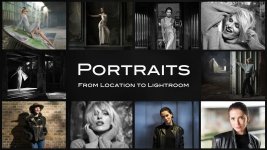
Join photographers and educators Damien Lovegrove and Piet Van den Eynde for a two-part masterclass shot in an abandoned chateau, derelict factories, and the streets of Ghent. Part 1 (70 minutes) follows the full shoot process, scouting, shaping available light, adding continuous light and flash, composing, and directing the model to create cinematic-style portraits. Part 2 (128 minutes) features Piet’s complete Lightroom workflow, taking every image from raw to refined with advanced masking, colour grading, and practical problem-solving techniques.
Part 1 - The Shoot
In this fast-paced, information-rich 70-minute video, Damien reveals every nuance of the shooting experience; how he reads a location, shapes the light, directs the model, and builds each portrait with clarity and intent.
Key themes and techniques covered:
Location scouting and lighting awareness
- How to rapidly evaluate a space and spot workable pockets of light.
- Understanding the natural behaviour of window light.
- When to shoot with available light and when to supplement it.
- Using small LED sources to emulate window light.
- Balancing warm and cool colour temperatures.
- Using backlight for depth, separation, and fashion-style atmospherics.
- Feathering and shaping light.
- How to find “ownership” and confidence in a pose.
- Adjusting micro-poses for light and shadow.
- Encouraging energy, warmth, and authenticity.
- Dealing with debris, graffiti, and unsafe footing.
- Why Damien sometimes takes a broom to a shoot.
- Working in high-contrast industrial environments.
- Using a smoke for atmosphere while maintaining contrast where it matters.
Part 2 - The Edit
After the creative capture comes the creative finishing.
In this extended, as-live 2-hour edit session, master retoucher and Lightroom expert Piet Van den Eynde reveals his complete Lightroom workflow, editing every image from start to finish. He demonstrates practical problem-solving, advanced masking, colour-grading, and how to unify a series shot across multiple environments.
Matching what you see in Lightroom to what your camera photographed
Here, Piet addresses one of the most-asked questions: 'Why do my images look different in Lightroom than they do on my LCD screen?' Piet talks about the advantages and possibilities of Camera Matching Profiles and how a simple change in setup can make sure that your images always look like you shot them!
Colour correction and creative colour grading
Piet guides you through both the technical precision of colour correction and the artistic freedom of creative colour grading. You’ll learn how to neutralise unwanted colour casts for clean, true-to-life skin tones, and then push your images further with cinematic palettes, subtle tonal shifts and mood-driven colour styles. Piet shows not only what to adjust, but why, giving you a complete understanding of how colour shapes emotion and how to use it to make your portraits truly stand out.
Creating timeless Black & Whites
Piet also takes a deep dive into black-and-white conversion, showing how to transform a colour image into a monochrome portrait with richness, depth and intent. You’ll learn how to sculpt tones and contrast, control luminance for clean skin tones, and use selective adjustments to further guide the viewer’s eye with a precision that analogue photographers could only dream of. This isn’t about simply desaturating an image, it’s about crafting a timeless, expressive look that highlights mood, character and form.
Shape Light and Detail with Advanced Masking Technique
A major focus of Piet’s editing workflow is the intelligent use of masking, one of the most powerful tools in modern Lightroom and Photoshop. Throughout the tutorial, he shows how targeted masks let you shape light, refine skin, enhance eyes, control backgrounds and add depth without affecting the rest of the image. You’ll discover why masks are essential for creating professional portrait edits; they give you precision, subtlety and complete creative control, allowing every adjustment to land exactly where it matters.
A Seamless Blend of Lightroom Efficiency and Photoshop Precision
You'll see how Piet keeps the workflow clean and efficient by doing as much as possible in Lightroom and using Lightroom's batch features to leverage one image's edits across multiple others quickly, but he also shows exactly when it’s worth stepping into Photoshop for the finishing touches Lightroom can’t handle. You’ll learn how to remove distracting elements such as graffiti with precision, and effortlessly extend or rebuild backgrounds that get cropped during straightening or recomposition. Piet will also show you why old-fashioned Photoshop tools are sometimes to be preferred to their shiny new AI counterparts. It’s a practical, real-world approach: use Lightroom for speed and consistency, and Photoshop only when it unlocks tools that are needed to take your portrait to a fully polished, professional result.
Please,
Вход
or
Регистрация
to view URLs content!